How do I unpair my remote?
Unpairing your remote
To identify your device model, look at the label under the EBOX TV set-top box:
- EBOX TV 1.0 (Sagemcom)
- EBOX TV 2.0 (Technicolor)
- EBOX TV 3.0 (Askey)
For EBOX TV 1.0 and 2.0
To unpair your remote control, press the “SETTINGS” and “LEFT ARROW” buttons for 5 seconds.
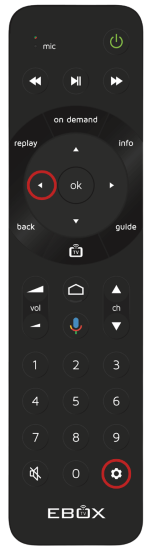
For EBOX TV 3.0
On the remote control, press the “OK” and “CH-” buttons simultaneously for 3 seconds. When the indicator light turns green, press “OK”. The indicator light will flash twice to confirm the dissociation.
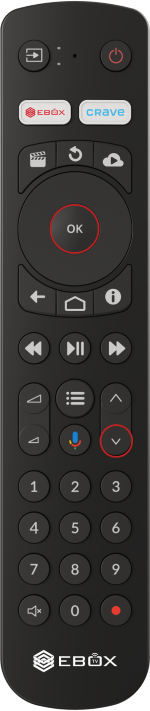
EBOX Internet you want it?
Sign up now